Generating a Homepage Template
Any new homepage development begins by generating a homepage project directory with Marble. This guide will show you why and how to generate a homepage project.
About the generate command
Marble uses a command called generate to set up a new project directory. (If you've used the previous homepage deployment tool Chalk, marble generate is just like chalk menu.) This command can be invoked with or without explicit command line options such as --domain; if it is invoked without options, Marble will prompt you for any required parameters.
For example, marble generate can be executed in any of the following ways:
With no options:
marble generate
With just one or a few explicit options:
marble generate --template rally
With many explicit options:
marble generate --repo_name marble-odp --domain marble-odp.demo.socrata.com --auth-env fedramp --template cityscape
You can learn more about all optional and required parameters for generate and other Marble commands in the command line API documentation (linked in the site map).
Generating a project
In the example below, marble generate is executed with the optional parameter --no-push-git (renamed from --no-git in Marble 1.2.0), which prevents Marble from performing a git push to Bitbucket upon project generation. Note that because --domain and other required parameters are not specified explicitly, Marble prompts the user for them:
DCPPLTDCICILLIO:Repos dominiccicilio$ marble generate --no-push-git
Domain URL: test4.demo.socrata.com
Template (cityscape, evergreen, homebase, rally, covid): covid
Repository name: test4.demo.socrata.com
Socrata auth environment (fedramp, rc, staging, eu) [fedramp]: fedramp
As an alternative, the above options could be specified explicitly as follows:
marble generate --domain test4.demo.socrata.com --template covid --repo-name test4.demo.socrata.com --auth-env fedramp --no-push-git
Once the required parameter values have been obtained, Marble validates external dependencies and generates the project. Here's an example of the output logs from marble generate:
[info]     Generating a new project…
[info]     Validating external dependencies: git, node, npm
[success]  Validated all external dependencies
[info]     Cloning socrata_templates repository…
[success]  Cloned socrata_templates repository: /Users/dominiccicilio/Documents/Repos/test4.demo.socrata.com
[info]     Installing npm dependencies: /Users/dominiccicilio/Documents/Repos/test4.demo.socrata.com/package.json

> coffeelint@0.5.7 install /Users/dominiccicilio/Documents/Repos/test4.demo.socrata.com/node_modules/coffeelint
> [ -e lib/commandline.js ] || npm run compile


> fsevents@1.2.9 install /Users/dominiccicilio/Documents/Repos/test4.demo.socrata.com/node_modules/fsevents
> node install

node-pre-gyp WARN Using request for node-pre-gyp https download
[fsevents] Success: "/Users/dominiccicilio/Documents/Repos/test4.demo.socrata.com/node_modules/fsevents/lib/binding/Release/node-v64-darwin-x64/fse.node" is installed via remote

> node-sass@4.12.0 install /Users/dominiccicilio/Documents/Repos/test4.demo.socrata.com/node_modules/node-sass
> node scripts/install.js

Cached binary found at /Users/dominiccicilio/.npm/node-sass/4.12.0/darwin-x64-64_binding.node

> core-js@2.6.9 postinstall /Users/dominiccicilio/Documents/Repos/test4.demo.socrata.com/node_modules/core-js
> node scripts/postinstall || echo "ignore"

Thank you for using core-js ( https://github.com/zloirock/core-js ) for polyfilling JavaScript standard library!

The project needs your help! Please consider supporting of core-js on Open Collective or Patreon:
> https://opencollective.com/core-js
> https://www.patreon.com/zloirock

Also, the author of core-js ( https://github.com/zloirock ) is looking for a good job -)

> core-js-pure@3.1.4 postinstall /Users/dominiccicilio/Documents/Repos/test4.demo.socrata.com/node_modules/core-js-pure
> node scripts/postinstall || echo "ignore"

Thank you for using core-js ( https://github.com/zloirock/core-js ) for polyfilling JavaScript standard library!

The project needs your help! Please consider supporting of core-js on Open Collective or Patreon:
> https://opencollective.com/core-js
> https://www.patreon.com/zloirock

Also, the author of core-js ( https://github.com/zloirock ) is looking for a good job -)

> node-sass@4.12.0 postinstall /Users/dominiccicilio/Documents/Repos/test4.demo.socrata.com/node_modules/node-sass
> node scripts/build.js

Binary found at /Users/dominiccicilio/Documents/Repos/test4.demo.socrata.com/node_modules/node-sass/vendor/darwin-x64-64/binding.node
Testing binary
Binary is fine
added 2224 packages from 1201 contributors and audited 2246 packages in 30.02s

3 packages are looking for funding
  run `npm fund` for details

found 77598 vulnerabilities (77526 low, 48 moderate, 19 high, 5 critical)
  run `npm audit fix` to fix them, or `npm audit` for details
[success]  Installed npm dependencies
[info]     Executing gulp generate script…
[success]  Executed gulp generate script
[info]     Initializing Git repository: /Users/dominiccicilio/Documents/Repos/test4.demo.socrata.com
[success]  Cleared previous Git repository
[success]  Initialized new Git repository
[success]  Added remote origin to repository: git@bitbucket.org:socrata/test4.demo.socrata.com.git
[success]  Finished generating project: /Users/dominiccicilio/Documents/Repos/test4.demo.socrata.com
If your output looks like the above, congrats! You have successfully generated a homepage template project.
Understanding the generate command
As you can see from the logs above, the generate command incorporates many moving parts. The overall flow of events is as follows:
- Validate installation of required external dependencies (Git, Node.js, npm)
- Clone the socrata_templates repository (a Node.js package) from GitHub
- Install socrata_templates dependencies using npm
- Execute
gulp generatescript, transforming the project directory structure to prepare it for deployment via Marble - Initialize a local Git repository for use on Bitbucket
- Push local code to Bitbucket repository (unless the
--no-push-gitoption, formerly named--no-git, is specified)
Understanding the gulp generate script
As noted above, marble generate leverages a gulp script that manipulates the socrata_templates directory structure to prepare it for deployment via Marble.
This separation of concerns allows the logic of homepage template architecture to remain decoupled from the logic of deployment, greatly improving the versatility and maintainability of our homepage deployment tools.
Common issues
node-sass build failures
node-sass is a socrata_templates dependency that builds for only one version of Node.js at a time; it won't automatically rebuild when switching from one Node.js version to another. This leads to errors like the following:
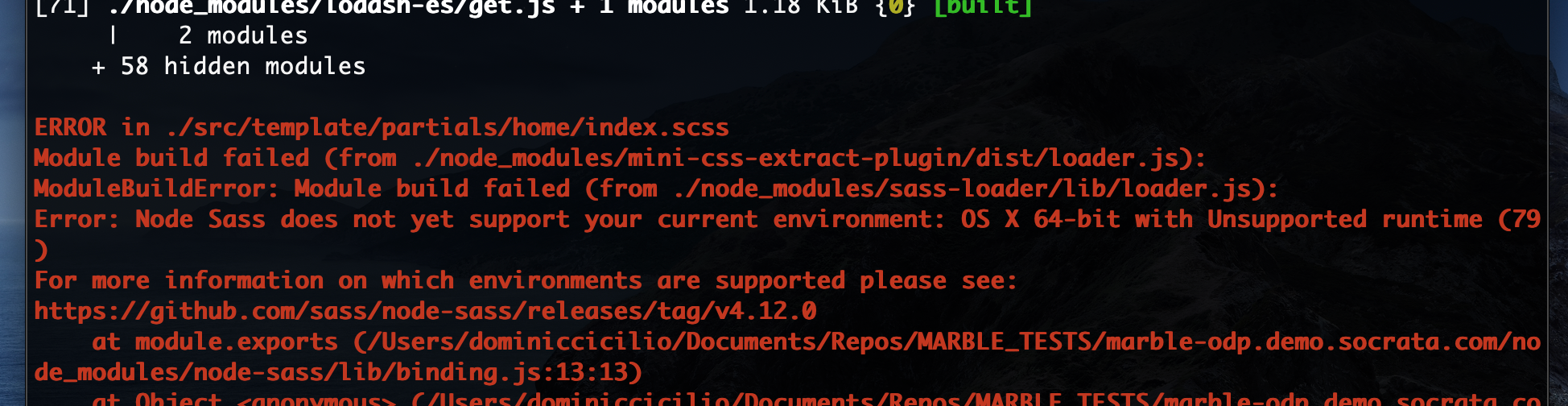
If you encounter such an error, execute npm rebuild node-sass in your terminal from your project directory root. Once you've rebuilt node-sass, you should be able to re-run the script that originally cased the error. If this does not fix the issue, please reach out to the GS developers for help.